UGC University
TikTok Shop guide
How to accept a brand's invitation and request your samples, step by step, and the TikTok Shop words you'll see along the way.
Collab invite
Your invitation from a brand, also called a target collab.
Showcase
The products people can shop from your profile.
Sample
A physical product you request to try and feature in your content.
Part 1 · Get the brand's invitation
- 1
Open the right TikTok account
Use the account the brand invited: the @handle you applied with. If you have more than one TikTok account, check which one is on your UGC University profile.
- 2
Open TikTok Shop for Creator
From your Profile, look in your creator tools or TikTok Studio for TikTok Shop for Creator. You are looking for the TikTok Shop Creator Center. If you see an application or setup screen, finish TikTok's required steps first. Menu names can differ by account and app version.
- 3
Tap Collab invites
It is in the TikTok Shop toolkit section. You can also find invitations in the TikTok Shop messages in your TikTok inbox.
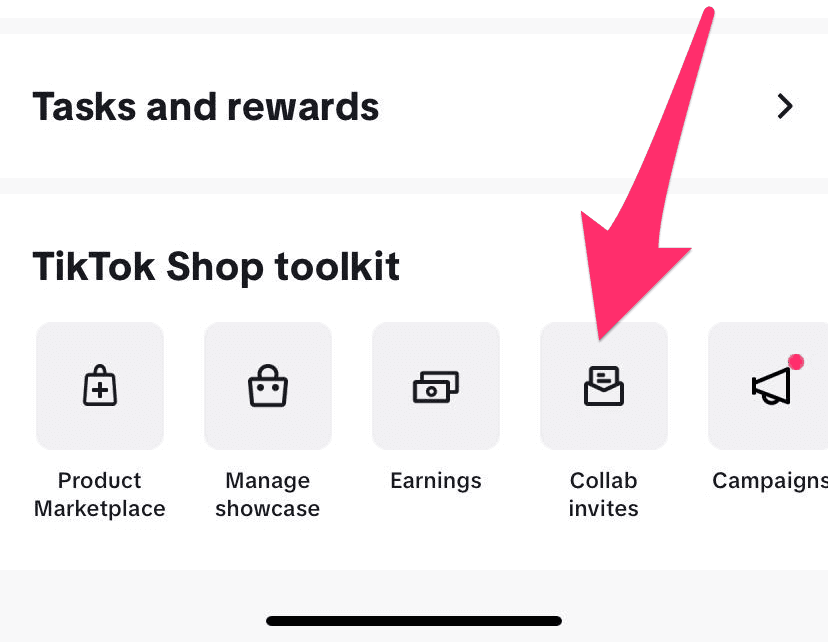
Official TikTok example. The arrow points to Collab invites. Cropped for clarity. - 4
Find the brand's invitation
In Collab invites, open All collab invites if you need to, then find the brand. Open the invitation to see their message and the products they picked for you.
- 5
Read the invitation
Check the product details, commission rates, dates and any instructions. A target plan may show up as a collaboration invitation, without the words "target plan".
- 6
Add the products to your showcase
Use the invitation's button. Some screens show Add beside each product, or Add all at the bottom, instead of an Accept button. Finish any confirmation steps, then check that the products are in your showcase.
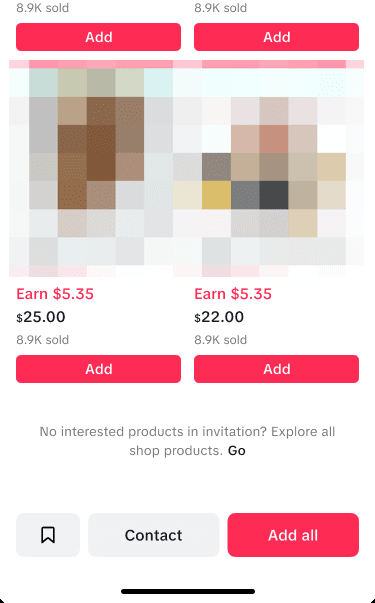
Official TikTok example. Add picks one product; Add all picks every product listed. A sample invitation, not a real brand's offer.
Part 2 · Request your samples
- 1
Open an invited product
Go back to the brand's invitation and open the product you want to request.
- 2
Find the sample option
Look for Get sample or a free-sample option. If a free sample is offered, open the options and choose Request from seller.
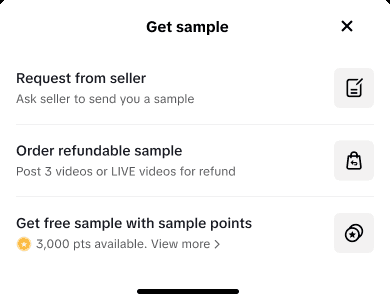
Official TikTok example. Request from seller is the free-sample route. The other options and their rules may differ on your account. - 3
Choose your shade, size or color
Pick the product options carefully, where there are any.
- 4
Check your shipping details
Check your name, contact details, address and apartment number. Only give personal information through TikTok's secure form in the app.
- 5
Review and send
Read the posting requirements and finish sending your request. Requests may need the brand's approval; they are not guaranteed.
- 6
Check Manage Samples
Go back to the Creator Center and open Manage Samples to see your request and follow its approval, shipping and content deadlines.
When your sample arrives
Check the deadline and posting requirements in Manage Samples. TikTok's current standard free-sample rule is shoppable content within 14 days of receiving the sample, with the right product linked. A qualifying video must stay public for at least 3 days; LIVEs have their own requirements. Always follow the requirements shown for your sample.
Troubleshooting
I can't find the invitation
Check that you are on the TikTok account you applied with. Look in All collab invites, including expired and canceled invitations. Still missing? Send the brand's team your exact @handle so they can check it.
I added the products but nothing has arrived
Check Manage Samples. A sample needs its own request: adding products to your showcase does not ship anything. Follow Part 2 of this guide.
There's no free sample button
It depends on your account, the products, sample limits and the invitation's settings. Send the brand's team your @handle, the product name and a screenshot so they can look into it. Hide your personal details before sharing a screenshot.
My sample request is pending
It may still be waiting for the brand's review. Check Manage Samples for its status and anything you need to do.
I can't open the Creator Center
Check that you are on the right account and have finished TikTok Shop creator registration and any verification steps. Not sure where you are stuck? Share a screenshot with the brand's team.
Need help with a brand's invitation or samples? Message the brand's team with your @handle and a screenshot: their community links are on the brand's page in Partnerships. For anything else about TikTok Shop, ask your coach. Keep your address and other personal details out of group chats and public posts.
Glossary
Getting started & shopping
- TikTok Shop
- TikTok's in-app shopping system for discovering, promoting and buying products.
- TikTok Shop Affiliate
- An eligible creator who promotes sellers' products for commission on sales.
- Creator Center
- The creator hub for finding products, samples, shoppable content and your results.
- Affiliate Marketplace / Product Marketplace
- The catalog where eligible creators find products to promote.
- Showcase
- The collection of products shown on a creator's profile for shopping.
- Product Detail Page (PDP)
- The page with a product's price, photos, reviews, options and seller information.
- Product Listing
- A seller's published offer for a specific product.
- SKU
- Stock Keeping Unit: one particular version of a product, like a shade, size or color.
- Variant
- A version of a product, such as its color, scent or size.
- Inventory / Stock
- How many of a product are available to buy.
- Seller / Merchant
- The business selling a product.
- Shop Tab
- A shopping area in TikTok where shoppers browse and buy products.
- FYP / For You Page
- TikTok's personalized feed of videos.
- Eligibility
- The requirements a creator or product must meet to use a TikTok Shop feature.
- T&Cs
- The terms and conditions of a program or collaboration.
Affiliate partnerships & samples
- Affiliate Commission
- Money a creator may earn from an eligible sale credited to them.
- Commission Rate
- The percentage used to work out an eligible commission.
- Standard Commission
- The usual affiliate commission rate offered for a product.
- Shop Ads Commission
- A rate that can differ, for eligible orders that came from Shop advertising.
- Estimated Commission
- Expected earnings before final changes, such as refunds.
- Actual / Settled Commission
- Commission made final under TikTok's settlement rules.
- Open Collaboration
- A seller's offer that lets any eligible creator promote its products.
- Target Collaboration
- A seller's invitation sent to chosen creators for specific products.
- Collaboration Invite
- A seller's offer to work with a creator on stated terms.
- Flat Fee
- A fixed payment for agreed content, separate from commission on sales.
- Free Sample
- A product sent under a sample program, often with content requirements.
- Refundable Sample
- A product the creator buys first and may be refunded for after meeting the stated conditions.
- Sample Request
- A creator's request to receive a product sample.
- Sample Approval
- The seller's or TikTok's acceptance of a sample request.
- Sample Fulfillment
- Preparing and shipping an approved sample.
- Posting Deadline
- The date by which the required sample or campaign content must be posted.
- Deliverable
- The content or work a creator agrees to provide.
- Seller Campaign
- A promotion involving chosen products, creators or rewards.
Content & creator vocabulary
- Shoppable Video
- A video with an eligible linked product viewers can buy.
- Product Anchor / Product Link
- The clickable product attached to a video or LIVE.
- Product Card
- A product display that leads viewers to the product listing.
- LIVE Shopping
- Selling or showing products during a TikTok livestream.
- Pinned Product
- A product highlighted for viewers during a LIVE.
- Hook
- The opening line or visual meant to grab attention.
- CTA / Call to Action
- A prompt asking viewers to take a next step, such as viewing a product.
- UGC / User-Generated Content
- Creator-style content made by users or hired creators.
- TOF / Top of Funnel
- Awareness content that introduces a problem, need or product type.
- MOF / Middle of Funnel
- Content that shows and compares options while viewers are deciding.
- BOF / Bottom of Funnel
- Content that answers objections and helps viewers choose.
- B-roll
- Extra footage, like close-ups, details and the product in use.
- Voiceover
- Spoken narration recorded over video footage.
- GRWM
- Get Ready With Me: a content format built around a routine.
- Wear Test
- Showing how a product holds up over time, like a day of wear or use.
- Before-and-After
- A comparison showing a change; it must be honest and not misleading.
- Affiliate Disclosure
- A clear note that the creator may earn money from purchases.
- Commercial Content Disclosure
- TikTok's setting or label for promotional content, where it applies.
Sales, analytics & earnings
- GMV / Gross Merchandise Value
- The total value of sales; TikTok's number may include orders later refunded or canceled.
- Direct GMV
- Sales credited directly to a creator's video, LIVE or product card under TikTok's rules.
- Video GMV
- GMV from shoppable videos.
- LIVE GMV
- GMV from shopping livestreams.
- GPM
- GMV per 1,000 product views: how well views turn into sales.
- Impressions
- How many times content was shown.
- Views
- How many times a video was played, under TikTok's counting rules.
- Reach
- How many different accounts saw the content, where shown.
- Engagement
- Interactions such as likes, comments, shares and saves.
- Watch Time
- The time viewers spend watching a video.
- Average Watch Time
- The average viewing time per play.
- Retention
- How well a video keeps viewers watching.
- Completion Rate
- The share of viewers who watch a video to the end, where shown.
- Product Clicks
- Clicks on a product linked from your content.
- CTR / Click-Through Rate
- The percentage of views or impressions that lead to a product click; check what the dashboard divides by.
- CTOR / Click-to-Order Rate
- The percentage of product clicks that turn into orders, as the dashboard defines it.
- Conversion Rate (CVR)
- The share of an audience or action that leads to an order; what it is measured against differs by report.
- Orders
- Purchases recorded by TikTok, depending on their status and attribution.
- Units Sold / Items Sold
- The number of single products bought.
- AOV / Average Order Value
- Total order value divided by the number of orders, for the same period or product.
- Attribution
- The rules for crediting a purchase to a creator's content or a channel.
- Attribution Window
- How long after someone interacts with content a purchase can still be credited.
- Pending Commission
- Commission not yet final or paid.
- Settlement
- Making eligible order and commission amounts final.
- Refund / Return
- An order change that may lower eligible sales and commission.
- Payout
- The transfer of earnings to a creator.
- Data Compass / Analytics
- The reports used to review content and sales results.
Advertising, offers & optimization
- GMV Max
- TikTok Shop's automated advertising, aimed at driving shop sales.
- Shop Ads
- Paid ad formats that promote TikTok Shop products.
- Ad Authorization
- Permission for a brand or seller to use a creator's content in ads.
- Video Code
- A code that may be used to let a brand advertise one specific post.
- Spark Ads
- An ad format that promotes regular TikTok posts, with the creator's permission.
- Ad Spend
- Money spent on advertising.
- ROAS
- Return on ad spend: credited sales divided by ad spend.
- ROI
- Return on investment; how it is worked out depends on which costs and returns are counted.
- Boosting
- Paying to show content or a product to more people.
- Coupon / Voucher
- A discount that applies under stated conditions.
- Flash Sale
- A price or offer for a limited time.
- Evergreen Product
- A product people want all year, not just during a short trend.
- Trending Product
- A product getting more attention or sales over a period.
- Product-Market Fit
- How well a product meets the needs of a particular audience.
- A/B Test
- Comparing two versions, such as two hooks or video openings.
- Creative Fatigue
- Results dropping because the audience keeps seeing similar ads.
Safety & compliance
- Substantiated Claim
- A statement about what a product does, backed by proper evidence.
- Medical Claim
- A claim that a product diagnoses, treats, cures or prevents a medical condition; often not allowed.
- Misleading Claim
- A claim or demonstration that gives a false idea of a product.
- Filter Disclosure
- A clear note when filters or effects noticeably change how a product looks in a demonstration.
- Paid Partnership
- A paid brand-creator relationship that needs proper disclosure.
- Usage Rights
- Permission saying how and where a brand can use a creator's content.
- Exclusivity
- A contract term that stops a creator working with competing brands for a stated time.
- Compliance Violation
- Content or behavior that breaks TikTok's rules.
- Appeal
- A request to review an enforcement or eligibility decision.
Formulas & TikTok links
- Estimated commission:
- Eligible amount × commission rate. Example: $30 × 20% = $6 before any changes.
- Click-through rate:
- 40 product clicks ÷ 2,000 video views = 2% (if those are what the dashboard uses).
- Click-to-order rate:
- 4 orders ÷ 40 product clicks = 10%.
- GPM:
- $150 GMV ÷ 3,000 product views × 1,000 = $50.
GMV is not the same as the commission you take home, and a view is not a sale.
TikTok's own help pages
- TikTok Shop Creator Center ↗
- Product Marketplace ↗
- Collab invites for creators ↗
- Free and refundable samples ↗
- How to manage samples ↗
- GMV and Direct GMV ↗
- Video performance metrics ↗
- Open collaboration ↗
Screenshots are TikTok's own examples: the products, dates and offers in them are not a real brand's campaign. Screens, features and eligibility can differ by account, country and app version. These are explanations, not promises of eligibility or payment. Steps checked October 28, 2026.